I am trying to get away from using physical media such as CD’s and DVD’s for the various types of media we have at home. Technology exists now that makes it far easier to sort, search and select what you want no matter what room in the house you are in.
One of my longer term goals is to get rid of cable. Myself I watch very few ‘regular’ TV shows, I do watch a fair number of documentaries and shows from England most of which I would download and watch on the computer. Both Alicia and I enjoy Sci-fi, but can’t stand the 20 minutes of advertising per episode. As well sometimes there can be a delay of a year before a show that we have heard about in the US or Europe makes it here to Canada. In the past I would download the show and would then burn it to a DVD so we could watch it on the big TV together.
I already had a large number of shows on my NAS (Network Access Storage) that I could watch from a computer but sometimes wanted to watch on the big screen. Enter the O!Play media player. This little gem plugs into your network and outputs to your TV. I’ve read some favorable reviews about the unit playing most formats. What really excited me was that the device saw the NAS without any fuss, something that some of the other ‘solutions’ could not offer.
In the past people have used X-Box or PlayStation to bridge the gap between network and TV The main problem was that most of these solutions required a PC to be on running media server software to see the files you wanted to use. I normally do not leave my computers on 24/7 but the NAS drive does stay on all the time.
I picked the unit up for slightly over $100 from the folks at Canada Computers here in London (Great store BTW). I brought it home and set it up as per the instructions. You have the option of having setting a fixed or dynamic IP address. For my initial test I had it get a DHCP address from my router which it saw right away. As soon as that was done I told the unit to search for machines on the network. It saw my NAS right away and all the shares I had setup for it. I scrolled into the TV directory and tried several different file types. All played without any problems.
I briefly tried the music sharing option and it works without too much complication, it sees all the MP3 files I have stored on the NAS, I admit I haven’t done much testing with this aspect as it’s not the primary reason I bought the unit for. There really isn’t much more to say. The unit just works and I can recommend it if you are looking for a good way to get your video from your network to your TV.
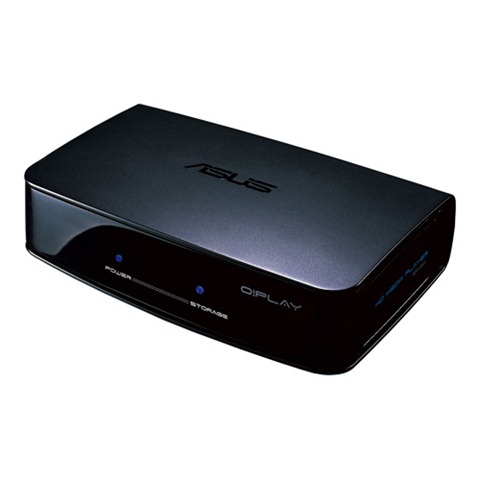
Specs from Asus
Specifications
Supported Formats
Video: MPEG1/2/4,RM/RMVB,VC-1,H.264
Video File Extension: .mp4,.mov,.xvid,.avi,.divx,.asf,.wmv,.mkv,.rm,.rmvb,.flv,.ts,.m2ts,.dat,.mpg,.vob
Audio: MP3,WAV,AAC,OGG,FLAC,AIFF,Dolby Digital AC3,Dolby Digital Plus,DTS Digital Surround
Image: JPEG,BMP,PNG,GIF,TIFF
Subtitle: SRT,SUB,SMI,SSA
I/O Port
Input:
DC Power In
1xUSB 2.0 Port
1xUSB 2.0 / eSATA Combo Port
RJ-45 LAN Port
Output:
Composite Video
Composite Audio L/R
S/PDIF Out
HDMI 1.3
Network
LAN:
TCP/IP (DHCP or Static IP Address)
10/100Mbps Wired LAN
And you thought you were going to post this without me adding some fanboi commentary about the Apple TV, did you? :>
Devices like this, which are made by computer companies and not A/V companies, seem to be free-er in what they can play. As you pointed out, the HDP-R1 seems to play every video and audio format any mortal could want. This is good.
I own an Apple TV (in case your other readers don’t know that). The Apple TV has some advantages over the HDP-R1. One, the Apple TV will network through a Ethernet cable or wi-fi and become an instant movie and TV show rent & buy store with thousands of titles. In addition, the Apple TV provides access to previews, trailers and podcasts from the moment it’s connected. The HDP-R1 is as useful as a dead fish unless you already have video files on a networked server to feed it.
Two, the Apple TV has both HDMI and component video outputs. If you don’t have a new flat-panel TV with HDMI, you likely at least have a CRT tube TV with component video, so you don’t have to degrade all the way down to composite video. If a person’s TV is really old and doesn’t have component video, they should skip the fancy-pants HDP-R1 or Apple TV and upgrade their TV first. They probably have a shelf of DVD movies that they haven’t gotten their money’s worth out of from not viewing them through a component video connection. Upgrade the TV and start there!
Three, the Apple TV can interface with any iTunes database running on any computer on the home network. It can both play any content in the iTunes library and allow movies and TV shows bought through the Apple TV to be viewed on the iTunes computer.
Finally, the Apple TV has an interface much better suited to the living room. While the HDP-R1 navigates like an ugly DOS browser, forcing the user to click though a network of servers and folders, the Apple TV interface is much more comfortable for humans.
The defeat of the Apple TV is it’s inability to play any content from the owner’s collection but what’s in iTunes. This means that the GB and GB of video that many people have around their hard drives needs to be converted to MPEG-4 and loaded into the iTunes database. There are lots of free conversion software out there, but the chore of converting all that video from one format to the other ruins the convenience of the device for most people.
In short, the HDP-R1 is a piracy-enabler, allowing the user to download ripped copies of movies and TV shows through torrents and newsgroups and view the files from the comfort of their couch. I do the same thing with my Apple TV, but with the extra pain of needing to convert everything to MPEG-4. The Apple TV has the halo advantage, however, of also allowing the user to rent or buy movies and TV shows with a button-click.
This kills movie piracy, in my opinion. For $5, I can watch my choice of movie from thousands, in Dolby Digital sound, as often as I want until it expires in 24 hours. If I love the movie, I can buy it. Why bother with finding and downloading ripped movie DVDs?
TV shows are another character. (Ha ha ha!) For $2, you can own an episode through the Apple TV. Rarely, however, do you want just one episode. Full seasons can be bought and “season passes” buy you all the past and future episodes of a show in mid-season. But now the cost of the season is starting to justify the effort of downloading each episode through less honest means.
Lastly, I came upon a feature of the Apple TV that turned my head around. Everyone has rabbits of remote controls in their living room and every new device on the A/V shelf brings one more. Many remotes attempt to one-for-alls, with programmable codes or learning cababilities. I’ve programmed the remote for my Yamaha receiver to operate all the devices on my A/V shelf … except for the Apple TV, which was created years after the Yamaha remote was. Then I found a remarkable, new feature in the latest Apple TV software update; the ability for the Apple TV to learn the signals from any remote control. Instead of attempting to enter a code into the remote that matched the device, here now was a device that would match itself to the remote! The set-up was simple; the Apple TV simply displayed each of it’s functions one-by-one as I pushed the buttons on the remote that I wanted to operate those functions. This idea of smart components learning their functions from the remotes that people already have in their living room needs to be adopted by everyone.